Sunday, 23 January 2022

The CMD SuperCPU, separating fact from fiction, Part I

The SuperCPU (SCPU) device is a hardware expansion which plugs into the back of a Commodore C64 or C128 (or will plug into the top of a C64 GS if you can find cartridge games to work with it). It has a WDC 65c816s CPU (similar to the CPU found in Nintendo's Super Nintendo Entertainment System) which is clocked at the breakneck speed (for the C64/128 platform) of 20Mhz. It has 128K as standard (I think on both the C64 and C128 models, and both the V1 and V2 units) and allows you to add up to 16MB of RAM that can be seen by the CPU in the cartridge expansion. It was first launched by Creative Micro Designs Inc. (CMD), and there are two different sources for a release date. One states Sunday, 4th May 1997, and the other states Saturday, 4th May 1996. I suspect the 1997 date is correct (when I was exactly 20 years old), but either way, new C64 machines had not been manufactured since 1993 and in many regions it was a dead platform.

Consider that the "World Wide Web" was in its infancy, and networked computers and devices where not as common in the home or workplace, so whilst there was an Internet with web pages that one could browse (and at the time, I did my best to do this with my 1200 baud C64 modem), there wasn't a significant Internet community keeping the C64 alive. Most information back then was still spread by magazines and fanzines, and hearsay. In the UK, dial up Internet connectivity was still a luxury, and the cost of dial up Internet was still something that many households would not justify. Either way, launching such a piece of hardware in the mid to late 1990s was a bold move by CMD. And it could do so because CMD hardware was awesome, and kept the C64 or C128 a very usable platform, hence the end user had no immediate reason to "upgrade" to "better" computers, especially I would say those users who had heavily invested their time and efforts into the fabulous GEOS operating system (which CMD supported avidly, and held the rights to distribute). And even now, the RAMLink is one of the best mass storage drives for the C64 or C128, and that was launched in 1990. Maybe I'll tell you more about the RAMLink in another post, as this is another piece of CMD hardware that isn't well understood.

My take on all of this is that CMD had a very loyal customer base because it kept the best computer platform of the 20th century very much alive. Most of the protagonists against CMD seemed to create a myth that it was not okay to upgrade the C64, and that all software must be compliant with the 1982 specification of the machine. Whilst this view is still prevalent today, there are always caveats to it, like "yeah but Sonic is allowed because [insert arbitrary reason]" or "Sam's Journey uses the REU for NTSC and that's okay because [some other arbitrary reason]". The point is that most personal or home computers worth owning (and even those not worth owning) had upgrades available. I mean, we don't religiously stick to the 1981 specification of the IBM PC, or the 1977 specification of the Apple ][, so why is the C64 different? Upgrades and addons tended to give a better user experience, that's why cartridges like the Action Replay from Datel Electronics, or the Super SnapShot by LMS Technologies were popular and remain popular today, especially given the slow drive access of the 1541 and the clunky way you performed disk drive commands in C64 BASIC. In my view, CMD made the very best and most compatible addons, expansions and upgrades for the C64 and C128. It was a sad day when it left the C64 market for pastures new.

You will note here that I've mentioned the C128. That's because CMD's hardware wasn't just C64 compatible, but worked with the C128 as well, not just in C64 mode either, but in its native modes (except for maybe the Z80 and CP/M, but I know nothing about this dark side of the C128 anyway, and it is perhaps the least used feature of the platform). So, if you think that the SCPU is only a C64 upgrade, you'll be wrong. There are two versions of it for the two machines, although the SCPU 128 does require an MMU Adapter which you carefully remove the MMU chip and place it into a new piece of electronics which allows the SCPU 128 to use the 40 and 80 columns mode natively. So if nothing else, any BASIC 7 programs will run faster, and your 80 columns screen will update more quickly. Although it's likely that your primary use would be GEOS or something like NovaTerm V2, or programming, as we know that the number of entertainment software titles available for the C128 is rather sparse though not completely unheard of.

As the SCPU supports both the C64 and C128 platform, the VICE emulation is only about half of the device, and I'm sure that the real hardware can do more tricks than the emulator does. So whilst the emulator is very cool, I don't think we'll see a full SCPU emulator anytime soon, and perhaps never. Firstly, the C64 scene doesn't really care about the SCPU. Secondly, it's a C64 scene, and the C128 is kind of like a forgotten relative that you don't see very often. And thirdly, I'm pretty sure that VICE is only emulating the SCPU V2 and not the V1. Okay, that latter point may be minor, but overall if you want to see everything that a SCPU can do, you'll need a C128 with MMU adapter and a SCPU 128. Then you'll have potentially at least everything that you'll need. But even with this, SCPU software is so sparse that I don't think we will see every trick that may be achieved with this hardware.

In any case, a short time ago, because of misinformation (or a common myth) that there are only three programs written for the SCPU, or only three programs worth loading, I started to create a list of all SuperCPU software that I could find. I began with CSDb.dk which currently shows 80 releases; many of these releases use the SuperRAM in place of the slower disk access (even with a fast loader, using the SuperRAM will be much quicker than the best 1541 speeds), so these releases may be enjoyed on an unexpanded system, just not these versions. I then started to look for the old sites I would pour over back in the late 1990s and early 2000s (those that I can still find at least). So far, I have 81 releases marked as "Games" (some of which actually for the C128 and even for 80 columns VDC display), 14 marked as "Demos" (no C128 stuff here), four GEOS releases (though I've not yet even scratched the surface), six under "Programming" and 44 other releases or software (including four "In Progress" and seven under the category "Cancelled or unknown"). In any case, there are definitely more than three programs for the SCPU. And of course, there are many different programs that benefit at 20Mhz. This latter category will take much longer to research and document, but I've at least made a start. You may view my research so far on on my Google Drive.

Aside from all of this software that is available, and that list is not just Metal Dust, Wolf 3D, and Doom, there is the question of how many SCPU devices were made by CMD. The total number by Maurice Randall would be easier to count, as this I suspect will be fewer than a couple of dozen. The highest serial number I've seen on CMD SCPUs for the 64 model is somewhere above 5k, and for the 128 model its around the 2700 mark. Now this may seem high, but it makes sense. CMD supported the Commodore platform until 2001. It could not have survived without selling its hardware in particular, as its software sales would not have sustained the company for so long. Its only a shame that more C64 users around that time who knew about CMD didn't support the company more, but then the hardware wasn't cheap. Cheaper than a new PC which be now would be completely obsolete and useless (unlike a C64 or C128 with a SCPU and RAMLink I might add, as although obsolete the very least new software is still being developed for the C64 and occasionally the C128).

Whilst you are reading this, I assume that you're also interested in the SCPU. If you are on Facebook, there is a group that was set up to discuss SCPU coding but is now widened its remit to include software as well. You may ask to join it here.

Wednesday, 28 February 2018

Sinclair Crap Games wanted!

Recently I decided to organise a Sinclair Crap Games Competition in the same vein as previous Comp.Sys.Sinclair Crap games Competitions. My inspiration was, and is, one of the greatest games magazines in history, Your Sinclair, which I have some fond memories of (including the great Advanced Lawnmower Simulator issues). So, with thanks to Paul Andrews and Retro Games Ltd, I launched the competition some weeks ago and so far we have five exciting entries for you to download and enjoy! Don't be a stranger now, be sure to check it out at our official website, or follow us on the Twitter at @CSSCGC2018 @shaunbebbers.

Sunday, 21 January 2018

Bouncing back

On Tuesday, 9th January 2018, I finally got around to releasing Bounce Redux through my friends at Monument MicroGames - the idea behind bounce was developed six years ago in my attempt to make a game as simple as it needs to be, and not simpler. At the time, I was studying Computer Games Programming at the University of Derby, and little did I know then that it would be the start of my career as a software developer. A few months later and circumstances forced my hand, and I had to leave my studies behind.

Bounce Redux was written in less than half the time of the original Bounce, the game engine is more efficient compared to the classic version and much of the source is reusable, which is an ideal situation for any developer, as writing a method, function or sub-routine once is the best way to go.

I now have three other ideas to develop for the Sincalir ZX81, and then I will be moving onto the ZX Spectrum. These are:

  1. Shoot Redux: With more efficient screen handling routines, I will be revisiting my attempt at an arcade game Shoot;
  2. Dodge: I got the idea from a recent C64 game that I played, simply to dodge the objects on the road ahead; and finally,
  3. Jump: This is more like a playform game for the ZX81.

Tuesday, 23 May 2017

A PET Snake

Recently, I have been programming some very old machines for a bit of fun, namely the Sinclair ZX80 and Commodore PET. And last evening I finished a game for Monument Microgames (MM) and it is available as a free download from the aforementioned website. It's a simple 'gobble and grow' affair, as MM point out, and requires 16K or more of RAM and a 40 columns display. I will get around to making the 80 columns version shortly.

If there is enough interest in this release, and in Commodore PET software in general, then MM will be publishing this with another game on real cassette and possibly floppy diskette. For more information, Twitter me @YearOfCodes. For now, here's a screen shot. Enjoy!

PET Snake for the Commodore PET - 16K RAM/40 Columns - tested on 3032

Tuesday, 28 February 2017

What Next?

What interesting things happen when you turn your back for a while.

For almost 13 years of my life, from February 2002 through to December 2014, I was a published writer for a long running, and now sadly defunct, computing magazine called Micro Mart. At some point in that time I occasionally penned pieces for other magazines (hint: one rhymes with Hetro Gamer, the other with samesTM). And now, the thing that I spent a lot of time and money to achieve seems to be happening. Here is just one example: my friend and head honcho at at Cronosoft, Simon Ullyatt, set up a independent software company to publish new (and perhaps unreleased) games for 8-bit machines, primarily the Sinclair ZX Spectrum. Back in the post-commercial and pre-hipster days, he used to sell - at best - maybe 60 games of any particular title in a year. These weren't like Atlantis Software style releases where you really did get what you paid for (I'm thinking more Commodore 64 releases here). These were and are high quality 8 bit games, many of which would have earned top marks from the likes of Crash and Your Sinclair had they been released back in the 1980s.

So a few years after necessarily stopping writing and leaving the whole 8-bit thing to other more capable people, things seem to be in a bit of a boom. For instance, Mr Ullyatt recently re-issued the very excellent Higgledy Piggledy, a 2005 game by Jonathan Cauldwell which I gave a 9/10 for when I reviewed it. He sold out of the reissues within the same evening as announcing it. So not even one day, but a single evening, is accounting for likely at least six months of sales just five or so years ago.

I only hope that this boom isn't followed by an almighty bust, as happened around 1983 to the fledgling video games industry back then. I mean as people realised that vinyl is much better (like much much better) than digital CDs or MP3s, I hope those people with seemingly deep pockets realise that you just can't beat a good, well thought out and produced 8-bit game. Who cares about how real the modern digital world can be when there's a whole world of pixels and imagination to explore from an old and familiar friend.

Sunday, 3 November 2013

Sandy White's Ant Attack ported to the Sinclair ZX81

Conventional wisdom is a funny thing; "Money doesn't grow on trees"(1), "Never look a gift horse in the mouth" and "You'll NEVER get a anything near a decent version of Ant Attack on the ZX81" are three well-known sayings that some people will heed, especially the last. So, what happens when someone attempts to fit Sandy White's sublime classic game into the meagre amount of memory and limited resources available on a ZX81 with a wobbly RAM pack? Could it really be possible?

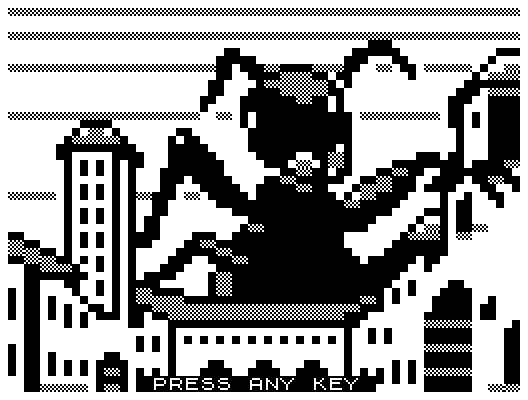
This is exactly what Bob Smith has done. Screw this conventional wisdom nonsense - let's make something happen must have been Bob's thought process here. After many months in the making, and just in time for Halloween 2013, he released Ant Attack 81 with the blessing and help of Sandy. So, what do we have here? Has this highly improbable game converted to the blocky and monochrome 8-bit personal computer done well enough to say that all of the work has been worth it?

Ant Attack 81 splash screen

I have to say that it's a resounding YES! To use a term that is used by younger folk than me, Bob has SMASHED IT!(2) From the stylish and blocky visuals, to the isometric scrolling, ravenous and scary giant Ants and most importantly of all the game play, this is everything that the original was without the high-resolution graphics. ZX81 fans will be chuffed to bits, as will many of those who consider the original game such an enduring classic. Best of all, it's available for non-commercial uses to download right now. If you don't have a ZX81 then fear not as a quick Internet search will find you a decent emulator (I use EightyOne here).

(1) Scientists have found traces of Gold in Eucalyptus Trees - source.

(2) This apparently means "rather resplendent" or something like that.

Wednesday, 2 October 2013

String [ ] args

I'm about to delve into the world of C#, an Object Orientated language heavily influenced by Java, on my current studies at Birmingham City University. And as happened when I attended the Foundation Degree in Enterprise Computing (or Computer Enterprise - I don't recall which way about), we're starting from the ground and working up. This is good even at MSc level because, for whatever reason, programming and software development are subjects that seems to have many people confused. As far as I'm concerned, it's Databases that's the difficult bit; in comparison to this particular field, programming is relatively easy. (I said relatively...)

One that that I wondered with Java is why String [] args in the main declaration? It wasn't until the second year of the Foundation Degree that this was explained. You see, before Windows, Workbench, STOS, GEOS and othe GUIs, there was DOS (and before that, CP/M I think), and as this still exists to a fashion even in Windows.

Anyway, String [] args is in there in C# and allows you to pass arguments or parameters to your Command Line application. Sometimes you don't need to make a Windows-based application. So, how does it work?

Firstly, let's open up Visual Studio and make a C# Command Line application. It should give you some source code to get started, which will look something like this (notice that I've called my application TestConsoleApplication):

using System;
using System.Collections.Generic;
using System.Linq;
using System.Text;
using System.Threading.Tasks;

namespace TestConsoleApplication
{
    class Program
    {
        static void Main(string[] args)
        {
        }
    }
}
  

At the moment, the Main is the entry point of the application, and it doesn't do anything yet, so let's add some code there, like:

using System;
using System.Collections.Generic;
using System.Linq;
using System.Text;
using System.Threading.Tasks;

namespace TestConsoleApplication
{
    class Program
    {
        static void Main(string[] args)
        {
            /// Sets the title bar on our console
            string consoleTitle = "Using Command Line"
                + "... Like a DOS!";
            Console.Title = consoleTitle;
            /// Set up a integer in local scope,
            /// initialising it to zero
            int counter = 0;
            /// Clears the console, like cls
            /// (CLear Screen)
            Console.Clear();
            /// Checks if there's any arguments first
            if (args.Length > 0)
            {
                /// If args has been added, then
                /// we'll loop through each one
                foreach (var arg in args)
                {
                    Console.Write(arg);
                    Console.Write(" ");
                    counter++;
                }
                /// Escape string for newline
                Console.Write("\n");
                Console.Write("\nNumber of arguments sent: "
                              + counter);
                Console.Write("\n");
            }
            /// Here's a generic message, like "Hello World"
            /// or whatever. Note: WriteLine adds a carriage
            /// return after writing the text
            Console.WriteLine("I can do Computers me!");
            Console.Write("Press the Any key to exit...");
            /// Wait for key-press
            Console.ReadKey(true);
            /* FIN - Exit application */
        }
    }
}
  

So, in Visual Studio, you have to build your solution before it will run: if you make changes without building, the compiled .exe will be the last build (and if you haven't built anything, nothing at all). Once built (and by default, it'll be a Debug version unless you state Release), you can run it from Command Line.

In my case, I put all my development stuff in C:\development\ - if it's PHP, there'll be a sub-folder in there called www, but this is windows, so that's the name of my sub-folder.

The path to the build in my case is c:\development\windows\TestConsoleApplication\TestConsoleApplication\bin\Release. From your start menu, type cmd.exe and navigate to your solution (if you've built a debug version, it will be in \bin\Debug not \bin\Release as here). If you type:

c:\your\path\to\bin\Release> dir *.exe

and press enter, you should see your built solution. In my case, it's called TestConsoleApplication.exe - so type your solution name in (I think the .exe is optional) and press enter.

As you've not sent any arguments to your solution (or program, or console application), it will not display anything. Try again, but this time, after the solution type Hello World and see what happens. Try any number of words or numbers, like The Quick Brown Fox Jumps Over The Lazy Dog and see what happens.

Okay, this is a trivial example, but it means that you can set any number of parameters in your program with a bit of thought. For instance, you could use a shell sort to display each argument alphabetically, but I'll leave you to think how one might do that.